Posts

Showing posts with the label photocopier

WHAT YOU SHOULD KNOW ABOUT PRINT MANAGEMENT SOFTWARE

Image
A managed print environment gives you a window into how to increase efficiency and lower costs . This includes knowing if your current devices are placed in the most efficient location based on usage. If your devices are deployed correctly based on your environment, your users are enabled to print more efficiently, and as a result, they will become more productive. You'll know if your devices are economical, and if they are the right fit based on print volume, device capacity and number of users. It's a sophisticated and data-driven approach to business printing.  So, how does it work? PRINT MANAGEMENT SOFTWARE Print management software is what makes collecting all of the information I listed above not only possible but simple. The software can track usage at various level, which can be predetermined based on your business. Usage data can be collected by department, by individual or by location - depending on what's right for you.  Beyond device locatio...

HAVE YOU CONSOLIDATED YOUR PRINTER, SCANNER, COPIER FLEET?

Image
Print technology provides some of the greatest tools available for work space efficiency, helping to speed up processes and cut costs. One of the ways this can be seen is through the consolidation of print technology, rather than having a printer, scanner, copier, etc. for each function. Investing in a multi function printer - a device that can perform a wide array of functions - is oftentimes a worthwhile purchase. ADVANTAGES OF CONSOLIDATING There are many reasons your printer, scanner, copier and fax functions should be combined into a single, multifunction device. These advantages include: Saving office space Knowing how to use a single machine instead of many different machines Working with a single company for service and repair needs Performing many tasks at the same time           For example, it can scan while copying or send emails as faxes are sent and                    ...

Difference between Copier and Printer

Image
Difference between Copier and Printer Key Difference: A copier is a photocopying device that allows users to make duplicate copies of a document or an image, that too cheap. Copiers use xerography technology that is similar to the technology used in a laser printer. Printer is a peripheral device that creates a solid copy of the digital data that is represented on the computer screen. Printers can be used to connect to a computer using a USB or wireless. When thinking about creating duplicates for a document, two things come to mind; one can print two or more copies or one can photocopy the original document. These two options are because of two devices a copier and a printer. With the increasing technology, many people are confused in these two different devices as many multi-purpose printers come with copier features. It’s quite simple to distinguish as a copier’s main purpose is to make duplicate copies, while a printer’s main purpose is to print. However, a multi-purpos...

10 things you need to know before buying second hand copiers

Image
10 things you need to know before buying second hand copiers If you are going to buy second hand copiers then there are some things you have to know about. These things will help you buy a copier that will work for longer than a few months and produce quality copies. If you buy a used copier then certain things have to be looked at. 1. Age of copier If you are looking to buy a second hand copier you need to know a little about the copier. The make and model is the first place to go but knowing how old the copier is would also be a good idea. The life span of a copier is only a certain number of years before you will not be able to use it any more. 2. Availability of spares There are certain things that you have to get for your copier. Ink cartridges are one of these things but there is a problem. After a certain amount of time a copier becomes obsolete and company will no longer manufacture the ink cartridges. Knowing if you can sti...

HOW TO CHOOSE THE RIGHT BUSINESS COPIER [CHECKLIST]

Image
Having an office copy machine in your business can drastically improve how your company operates. With the right copier, you won't have employees lined up waiting for jobs to be completed, or wasting time doing manual tasks that could be automated. Essentially, with the right copier, your employees spend more time doing tasks that significantly affect your bottom line. When choosing which copier is right for your business, ask yourself the following questions: WHAT WILL THE COPIER BE USED FOR? Make a list of tasks you expect your office copy machine to perform. For example, many businesses use their machines for copying, scanning, faxing, printing, folding, stapling, binding and saddle stitching. With the right office copy machine, these tasks can be automated. It's a good idea to separate the task list into two columns: must-have features and wanted features. While your copier must be able to print, saddle stitching would be ideal but not be essential. ...

New Copiers vs. Used Copiers

Image
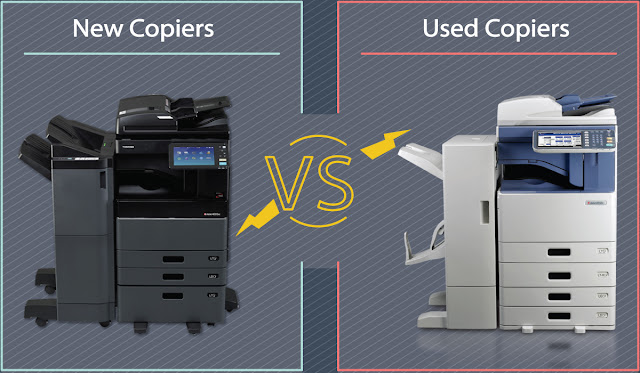
The battle is on! New? Used? Which offers more value in the long run? Is it the same as purchasing a car? When shopping for a new multi function copier for your office, you will certainly come across the idea of investing into a refurbished copier instead of a brand new one. Choosing used over new has both of its advantages and disadvantages. This article is going to clearly lay out both so that you can make an informed decision on your own. New Copiers New copiers are, in many ways, like new cars: they have brand-new technology, are compatible with the latest accessories, and have not been exposed to wear and tear from use. However, also like new cars, new copiers are rather spend and often lose part of their value once taken home from the store. Used Copiers There are three basic types of used copiers: lease returns, refurbished, and discontinued showroom models. Lease Return: To continue with the car analogy, buying one of these copiers woul...

Tips to Keep Your Office Copier in Good Working Order

Image
Learning how to maintain and keep an office copier working properly will make your workday easier. Make your bed, floss your teeth, and … clean your copier? Are you the kind of person who makes your bed every morning? How about flossing? Do you even buy it anymore since it was deemed pointless last summer? While we may not remember (or like) to do these things, deep in our hearts we all know we should. Just like taking care of you copier. We’d all like to unload on it sometimes (remember that iconic scene in Office Space?) While slamming those doors and drawers might make you feel a little better when it jams, don’t forget that the way you use and care for your copier can greatly affect its overall performance in the long run. The better you treat it, the better it will treat you. Learn and use these tips to keep the copier repairman away. Copiers (and most electronics) Need (a little) Time to Warm Up If the copier hasn't been used in several days, such as...

Tips for Buying Used Copiers

Image
Copying equipment for home or business use is indispensable when you need a dependable copier on a daily basis. Many entrepreneurs run their businesses from home, and day-to-day affairs hinge on access to functions an in-house copier provides. Before purchasing a used copier, consider some of these tips. Decide on Must-have Features If your business works frequently under tight deadlines, a copier such as a Canon iR has a document feeder to copy multiple originals at one time, duplex for making double-sided copies, reduction and enlargement features, and has several page sizes from which to choose. If you use only one size paper for all projects, for example A3, then only review those types of copiers. Consider whether you need to copy in grey scale for graphs, black and white for regular copying, or color copies for presentations. A photocopier is necessary for anyone who scans, prints, and copies photos. Decide on the minimum pages per minute required to work efficiently...

6 TIPS TO CONSIDER WHEN YOU'RE READY TO LEASE A COPIER

Image
6 TIPS TO CONSIDER WHEN YOU'RE READY TO LEASE A COPIER A “copier” is certainly more than a copier these days. Today’s copier is a multi-function device (MFD) that does a lot more than just make copies. Printing, scanning and faxing to name a few. An MFD is truly an on-ramp to a business’ workflow, so not having the right technology in place can be more than just a frustration—it can affect your core business practices and your bottom line. I’ve been in the office technology business for over 23 years and in that time I’ve noticed some common denominators factoring into misplaced machines. Here are my tips to help guide you into your next copier lease MFD lease: 1. Printing Volume Know your volume including what type of material you run through the machine. MFD models are designed for specific usage levels. You don’t want to be running 5,000 pages to a machine spec’d for 50,000 pages/month as much as you don’t want to be running 20,000 on a machine spec’d for 5,000 p...

How does a photocopier work?

Image
How does a photocopier work? Dan A. Hays, a senior fellow at the Xerox Corporation's Wilson Center for Research and Technology, explains. The xerographic process, which was invented by Chester Carlson in 1938 and developed and commercialized by the Xerox Corporation, is widely used to produce high-quality text and graphic images on paper. Because Xerox marketed the first plain-paper copiers, photocopying machines made by other companies are sometimes referred to as "Xerox machines" by those who dont realize its a misuse of the companys trademark. In addition, the xerographic process is actually used to make both copies and prints. Carlson originally called the process electrophotography. Its based on two natural phenomena: that materials of opposite electrical charges attract and that some materials become better conductors of electricity when exposed to light. Carlson invented a six-step process to transfer an image from one surface to another using these ...